Record Internet TV and Internet Radio Shows
More and more TV and radio programming is being broadcasted on the Internet. Whether it's a radio talk show or your favorite TV show, you don't want to miss it. But what if you're away from your computer when your show is broadcasted? With My Screen Recorder Pro, you can record the show and play it back when you have time to watch it. Record any TV or radio show broadcasted over the Internet, and watch or listen when it's convenient for you.
How to Record Internet Television Broadcasts
Here's how you would set up My Screen Recorder Pro to automatically start recording at the desired time.
Click Tools >> Schedule Recording. To add a schedule click the New button. Create a name for your schedule and make sure the recording type is set to PC screen with audio. This will allow you to capture the sound from the Internet TV broadcast. Now you need to specify the recording schedule: the date, day and the time of the show. Set the recording duration.
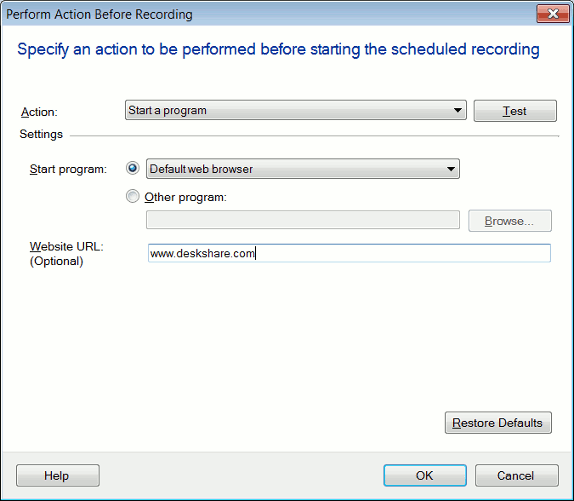
When you finish setting the date and time, click New to specify an action to be performed before the scheduled recording starts. You can choose to launch your browser and open the website URL. Copy the URL from the Address Bar of the web browser and paste it into the website URL field shown below:
Recording Internet Radio Broadcasts
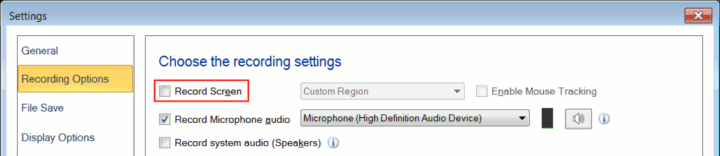
Internet radio shows can be recorded exactly the same way as TV shows, with one difference. When recording Internet radio shows, you want to capture just the audio. To avoid recording the video, click Tools >> Settings >> Recording Options and disable the option Record Screen.
The resulting recordings will be an audio file which you can play on your PC or MP3 player. With My Screen Recorder Pro you can easily set up your PC to record Internet TV and radio shows.