-
Using Scene Detection in Auto Movie Creator
-
Creating Photo Slide Shows Using Auto Movie Creator
-
Creating High Quality YouTube Videos
|
| |
Auto Movie Creator 3.26 |
| |
|
| |
|
| |
Create High Quality YouTube Videos |
| |
|
| |
You've probably noticed that even though all YouTube videos are not all the same quality. The tips in this article can help you to get the best possible quality from your videos on YouTube.
Your YouTube video can never be better than the original recording, so read the guide Planning and Shooting Your Videos. If possible, shoot in standard 4:3 aspect ratio. If you use widescreen footage it will be shrunk to fit the space and lose quality.
When you upload to YouTube, you need relatively low resolution video. YouTube always reduces resolution to their standard 320x240. If you record at HD resolution and simply let the YouTube server convert the video to their format, the result will lose a lot of detail. They currently request that uploaded video be in 640x480 resolution. One way to reduce the resolution without losing detail is to use Auto Movie Creator's Pan and Zoom effect. You can zoom in and show only a 640x480 pixel area
As you can see, by using Pan and Zoom we can show the important part of the picture with much more detail and clarity.
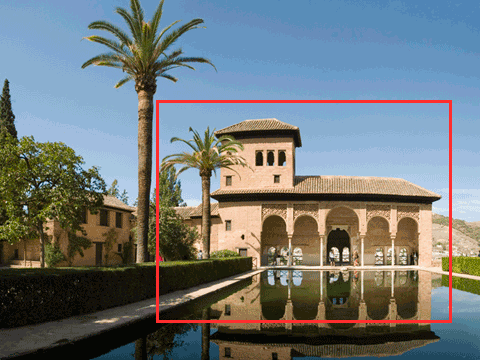
llustration 1: Original image, showing Zoom area
 
llustration 2 : Image Reduced to 640x480 without zoom llustration 3 : Image cropped to 640x480 using Pan and Zoom
Remember the limits that YouTube imposes: videos may be no longer than 10 minutes, and no larger than 100 mb. If your video is over 10 minutes in length, you can use Auto Movie Creator's Split or Scene Detection functions to divide it into shorter segments and upload each separately.
- With Auto Movie Creator, you don't have to worry about technical details. Export your movie and choose Share on the Web >> YouTube. For maximum quality, use the default settings.
- When the export process is finished, Auto Movie Creator will automatically open YouTube's home page in a web browser. If necessary, sign in, then upload your new video.
If you would like to share video online with no limits on resolution or duration, you should try Video Desk. Files stored on Video Desk can be streamed as video email or easily added to your web page, blog, LiveJournal or MySpace page. Sign up for a free account today.
By following the steps above, you can create eye-popping high quality video for YouTube. Wow your friends and customers! Start right now by downloading free trial version of Auto Movie Creator !!
|
|