Security Alert: Get Email Notification With Photos
In a security emergency, minutes matter. Alert the police quickly, and criminals can be caught in the act. Call the fire department right away, and you can save your house or business from major damage. On the other hand, false alarms waste the valuable time of emergency personnel.
Home and office monitoring software such as WebCam Monitor detect motion and trigger actions like video recording, raising audio alarm and sending e-mail. E-mail notification will alert you seconds after a motion event is detected, and include a picture of the event with your e-mail.
There are many reasons you might want to be alerted by e-mail when motion is detected:
- Keep an eye on sleeping children or the elderly
- Watch for intruders in your back yard
- Detect unusual activity in your home or office
Setting up an e-mail alert system is easy. You need a computer running WebCam Monitor, and at least one webcam. After installing WebCam Monitor and setting up your camera, configure actions. To trigger an alert when motion is detected, right click on camera preview and select Edit Camera >> Actions and select the option When motion is detected. Click on configure button of E-mail Notification action  . Following dialog will be shown:
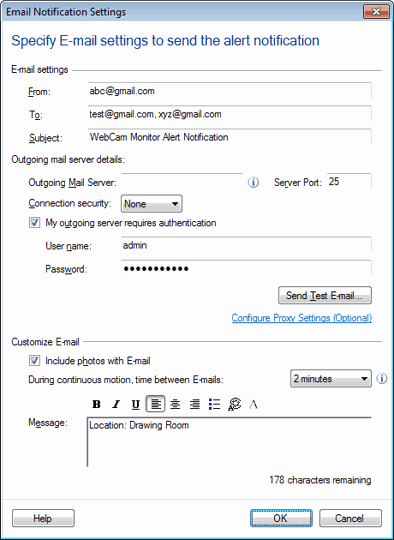
Specify a valid e-mail address in the From and To fields. Using a comma (",") you can specify more than one email addresses in the To field. Examples of valid addresses are address@company.com or "Friendly Name" . You can enter the Subject.
In most cases, you will need to Send e-mail using Outgoing mail server. If e-mail client such as Microsoft Outlook is configured on your machine then WebCam Monitor will automatically copy information from the Account Settings. Generally, your Internet Service Provider (ISP) supplies a mail server. You can find the necessary information by contacting your ISP.
You can select the Connection security to ensure the security of your e-mail. If the outgoing mail server asks you to log in before sending e-mails then check the Outgoing mail server requires authentication option. Specify the login information in the User Name and Password options. After entering the server information, click Send Test E-mail. If a test message arrives in your mailbox, the settings are correct.
Google's GMail service blocks unencrypted outgoing mail. Because of this, GMail cannot be used as an Outgoing Mail Server with WebCam Monitor. You can send email to GMail addresses. Generally, it is best to use your ISP's mail server.
Any Yahoo! account can receive email from WebCam Monitor.
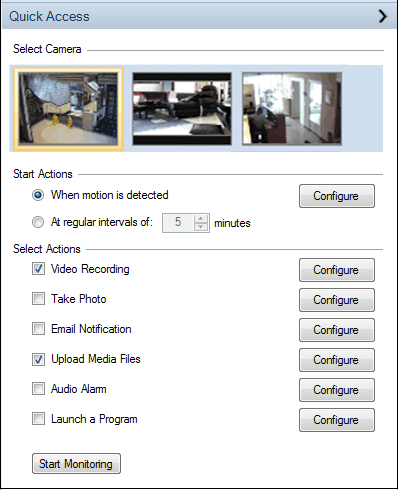
Remember, you can run several alerts at once. A very common and useful configuration is to have WebCam Monitor send you e-mail notification, and also record audio and video. Simply select both options in the Quick Access area.
E-mail alerts are an important feature to have when choosing a security monitoring system. WebCam Monitor alerts you when motion occurs with an e-mail and photo so you feel confident and secure.