Shopping Cart
|
Sign In
Products
Video Surveillance
Security Monitor Pro
WebCam Monitor
IP Camera Viewer
PC Desktop Recorder
My Screen Recorder
My Screen Recorder Pro
FTP Client
Auto FTP Manager
FTP Manager Lite
Speech Tools
Text Speaker
Dictation Pro
Digital Media Converter Pro
Team Task Manager
Document Translator
Purchase
Order Online
Order by Phone
Order by Mail or Fax
Purchase Priority Support
Downloads
Support
Support Forums
Frequently Asked Questions
Contact Technical Support
Lost Serial Number
Resources
Articles
Tutorials and Manuals
Newsletter
Company
About DeskShare
Press Room
Contact Us
Welcome Guest
Search
Login
Notification
Error
OK
DeskShare Support Forums
»
Auto FTP Manager
Tag as favorite
How to transfer only selected files from a FTP server?
Retweet
Lance10
Posted :
Thursday, December 10, 2015 7:05:32 PM(UTC)
I am looking for an FTP client which I can use to download only the files which I need. When I automatically download, I end up transferring everything on my ftp server. Is there anything in Auto FTP Manager that will help me just get selected files?
User Profile
View All Posts by User
View Thanks
Retweet
DeskShare - Support
Posted :
Friday, December 11, 2015 12:10:13 AM(UTC)
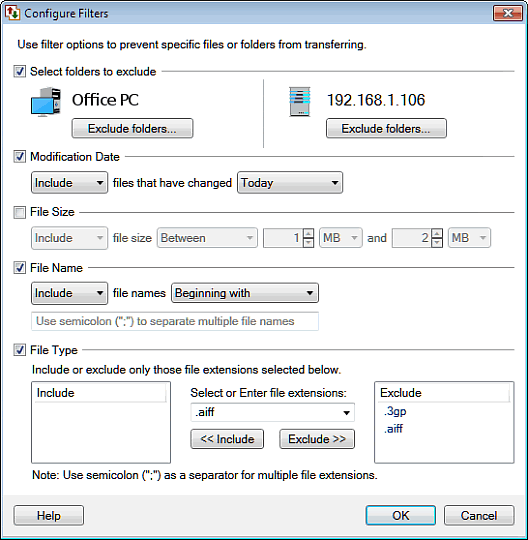
You can download the required files by using the filter rules in
Auto FTP Manager
.
By using
filters
you can select files with certain file types, names, etc. There are four types of filters you can set for files during automated transfer, those are Modification Date, File Size, File Name and File Type.
Here is an example:
User Profile
View All Posts by User
View Thanks
Email this topic
Watch this topic
Print this topic
Atom Feed
RSS Feed
» Normal
Threaded
Home
|
Purchase
|
Downloads
|
Support
|
Resources
|
About DeskShare
|
Privacy Policy
|
Contact Us
Copyright © DeskShare Incorporated. All rights reserved.